Showing posts with label pedigree chart. Show all posts

Monday, January 15, 2018

My Heritage now has the essential DNA tools.


I began my post Getting started with GEDmatch with the following discussion:

_________________________________________________________________
There are two very important items for using DNA testing for family history. 

  • Documented family tree. A documented family tree contains proof of family relationships including copies of birth and marriage records, census records, etc. 
  • Documented DNA. Documented DNA includes a chromosome browser to prove family DNA relationships. To learn more about the importance of chromosome browsers and how to use them, please see What is the big deal about a Chromosome Browser?

You may have heard the saying, "Genealogy without documentation is mythology."  I'd like to also say, "DNA without a chromosome browser is mythology."

It would be wonderful if the documented family tree and the chromosome browser were together in one location. 
__________________________________________________________________

A documented family tree and documented DNA has not been available at any of the major DNA testing companies. Until now.


MyHeritage tools


MyHeritage has had documented family trees for years. For the past few years, it has been offering autosomal DNA tests. But it was on January 11, 2018 that MyHeritage finally offered the essential chromosome browser. See Major Updates and Improvements to MyHeritage DNA Matching.

Let's examine the new MyHeritage system.


Your DNA matches 

 
Log into your MyHeritage account. Click the DNA tab, then select DNA matches from the menu.


MyHeritage DNA matches


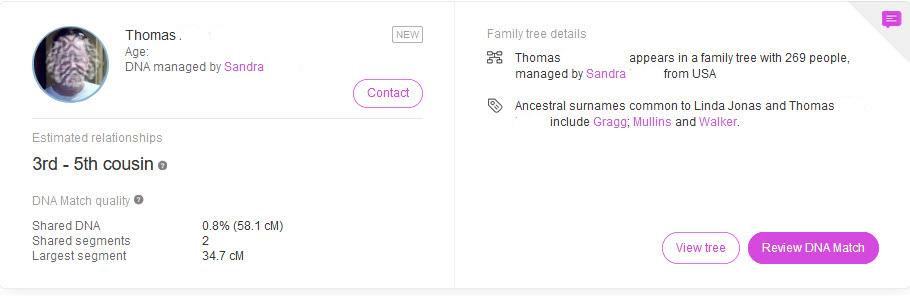
You will see a list of people who share common DNA segments with you. Here is one of my matches.

MyHeritage DNA match


Even though there is a link to "View Tree", it is best to click Review DNA Match. We want to see what information is shared between my match Thomas ("Tom") and me.

I contacted this person, and I know that both Tom's and my kit were transferred from Ancestry DNA. So we will be comparing two Ancestry DNA kits with MyHeritage tools.

Click "Review DNA match." You will see everything on one page.


Common surnames


If you and your match have any common surnames in your trees, they will be shown. My ancestors appear on the left, and my match's ancestors appear on the right. This is one of the common surnames:


MyHeritage matching surnames


Common DNA matches


In the next section you will see a list of common DNA matches.  These are some of the people who appear on Tom's match list and on my match list.


MyHeritage DNA matches


Family Trees


You can see both your own and your match's family tree so that you can easily compare the two.  Click on the "You" tab to see your tree.


This is a portion of Tom's family tree.


MyHeritage family tree


In our match's family tree, we are looking to find ancestors who are also in our family tree. The common ancestors that Tom and I share are Jonathan Gragg and Mary Mullins. 

By comparing the two family trees, we accomplish two things:
  • We can find our common ancestors, and use the chromosome browser to find DNA segments that we may have inherited from those ancestors.
  • We can enhance our family tree if we find ancestors that are missing from one of the trees. For example, in the second family tree there are no parents for Jonathan Gragg. We can click on Jonathan Gragg to begin exploring records that could verify that his parents are Henry Gragg and Elizabeth Jones.


MyHeritage family tree


Below the family trees, you will find a section for common ethnicities [not shown], then we get to the chromosome browser.


MyHeritage chromosome browser


The chromosome browser shows DNA segments that are shared between you and your match. 


MyHeritage chromosome browser


By comparing family trees, I have determined that the only common ancestors shared by Tom and me are Jonathan Gragg and Mary Mullins. So I assume that we inherited the above two segments from either Jonathan or Mary, or we inherited one segment from each of them. I cannot be sure of any of this yet.

When you click on a segment in the chromosome browser, you will see segment details including the exact position on the chromosome and the size of the shared segment stated in centiMorgans (cM).


DNA segment details


How valid are these DNA segments?


I cannot be certain that we inherited these common segments from Jonathan or Mary, or if there is another common ancestor that we have not yet found. 

I can get more evidence by comparing DNA with other descendants of this couple to see if they also share the same segments.


GEDmatch chromosome browser


MyHeritage does not yet allow us to compare more than one person in the chromosome browser. [Update: You can now compare multiple people in the MyHeritage chromosome browser.  It's fantastic!] Several descendants of Jonathan and Mary have been DNA tested. We can see their results in the GEDmatch.com chromosome browser to compare it to Tom's results in the MyHeritage chromosome browser.

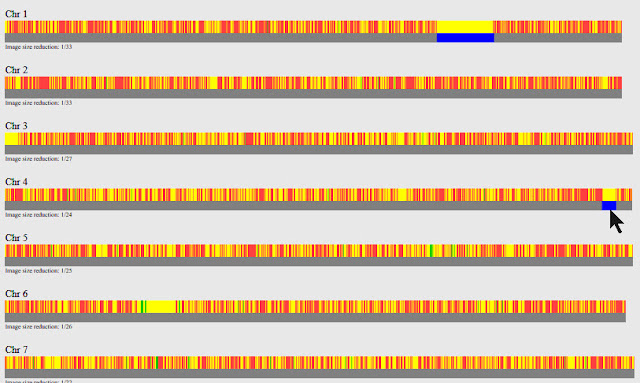
First, I can compare my DNA results with Tom's DNA results and display them in the GEDmatch chromosome browser. The shared segment on Chromosome 1 is shown in the GEDmatch and MyHeritage chromosome browsers. 

However, notice that there is a small shared segment on Chromosome 4 that is not reported by MyHeritage.

GEDmatch chromosome browser


Below are chromosomes 9-22. The matching segment on Chromosome 18 is also shown at MyHeritage.


matching DNA segment


Now let's compare two other descendants of Jonathan and Mary, and put them in the chromosome browser with Tom.

All three descendants share a segment with me on Chromosome 1 and Chromosome 18. Chromosome 18 is shown here:


multiple matches on chromosome


What about Chromosome 4? Tom and one cousin share matching segments with me on chromosome 4, but they are different segments. Only Tom has the small segment on line 2 of Chromosome 4. Although this segment is slightly larger than 8cM, it is not shown by MyHeritage. 


small DNA segments


Because only Tom has this segment, it could a coincidental match [called IBS or Identical By State] instead of a segment inherited from the common ancestor [called IBD or Identical By Descent]. It may have been correctly rejected by MyHeritage.

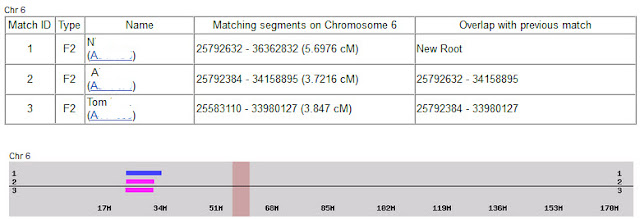
How about this match on Chromosome 6? All three cousins share this segment with me on Chromosome 6, but this segment is too small to be considered a shared segment by MyHeritage.

small DNA segments


It appears that MyHeritage is showing only segments in its chromosome browser that seem to be high-confidence shared DNA segments. 


Add notes 


When you have found shared DNA from common ancestors, you can include this information in the notes on your DNA match list. 


MyHeritage notes


Using the chromosome browser with transferred kits


MyHeritage allows you to transfer your raw DNA data file from other DNA companies. You can do this for free. 

However, you might want to be cautious about using the chromosome browser with transferred DNA because the major DNA companies do not all test the same locations on your chromosomes. 

To make these other DNA results compatible with MyHeritage DNA results, MyHeritage uses something called "imputation." See Major Updates and Improvements to MyHeritage DNA matching.  For another opinion on imputation, see Concepts - Imputation.

When MyHeritage fills in your DNA gaps by imputing your results, it is not necessarily reflecting your DNA. It is reflecting what your DNA probably should be. 

However, by comparing DNA segments of multiple matches in the chromosome browsers where imputation is not used, MyHeritage appears to be fairly accurate.


Upcoming enhancement

MyHeritage has already announced the plan to allow us to compare two or more people in the chromosome browser. This will allow us to see the shared DNA segments inherited by multiple descendants of a common ancestor.   


What is the next step? 

If you have tested with another DNA testing company, you can download your Raw DNA Data and upload it to MyHeritage. 

This is especially important if you tested with Ancestry DNA, because Ancestry is the only major DNA testing company that does not provide a chromosome browser. There is currently no charge for uploading your DNA results to MyHeritage.

You can also download your family tree from other sites and upload it to MyHeritage. Again, this is free! 

For step-by-step instructions on downloading your DNA and your family tree, see Getting started with GEDmatch.

If you have compared your ancestry in the new MyHeritage chromosome browser, you can reconstruct your ancestor's DNA.

See Using DNA Painter to reconstruct ancestral DNA

If you tested with MyHeritage, you will also want to submit your MyHeritage results to GEDmatch, See How to use GEDmatch - Part 1 and How to use GEDmatch - Part 2.


MyHeritage now has the essential DNA tools.  


The new MyHeritage DNA system is pretty great. With a few enhancements, it will be incredible.  Here's my response to the new chromosome browser--I immediately ordered a MyHeritage DNA kit for my mother.


MyHeritage DNA kit
MyHeritage DNA kit

swabbing for DNA
Mom swabbing her cheek while reading a book


Tuesday, August 29, 2017

Setting up for great DNA matches


If we hope to find more DNA matches, we have to first get our DNA accounts set up properly, create some online family trees, and then advertise like crazy.

Since I was in the process of finding my paternal surname line, I first ordered a Y-DNA test from Family Tree DNA (FTDNA). Then I had to properly set up my FTDNA account. Here are the important steps.

ACCOUNT SETTINGS

First, log into www.familytreedna.com (or ftdna.com -- they both work) with your kit number and password. Next, click on your name in the upper-right of the screen to bring up the drop-down menu.

Family Tree DNA account settings

Whether you click My Profile, Privacy Settings, or Account Settings, you will see the following tabs. You will want to click on each one of them.


On the Contact Information tab, make sure that your email address is correct so that people on your list of matches can contact you. Make sure that your mailing address is current in case Family Tree DNA needs to send you another kit (this Thompson kit is now on its second DNA sample because I have run so many tests).

On the Account Settings tab there is a section called My Story. Here is where I post links to my online family trees and any other information I think is important. You may want to add a profile photo because people are more likely to contact someone with a photo.

On the Genealogy tab you will want to pay special attention to all three links: the Family Tree, Earliest Known Ancestors, and the Surnames link.


On the Family Tree link, change the default settings, and at least set Deceased People Born 100+ Years Ago to "Public."

In the Earliest Known Ancestors there is a section for Direct Paternal and Direct Maternal. These are for Y-DNA and mitochondrial DNA (mtDNA). In the Direct Paternal section you enter the name of your most distant known ancestor on your father's side (your father's father's father's father . . .). This is the name that will appear on all Y-DNA projects. Enter a name, date, and place.  Here's an example: "Electious Thompson, b. 1750 Maryland."  In the Direct Maternal you enter your mother's mother's mother . . .). This name will appear on all mitochondrial DNA projects.

The Surnames section is for autosomal DNA (the Family Finder test). Here you will edit surname information that will be created once you add your family tree.

Next, click the Beneficiary Information, and enter the contact information for someone who can take over your account when, at some time in the future, you are no longer able to do it. Remember, we are setting up for the long term!

Last, click Privacy and Sharing. This one is critical. Change almost all of the default privacy settings.  For example, change "Who can view my DNA results in group projects?" to "Anyone." Otherwise you will join a project but nobody will be able to see your results. Our results are only useful when we compare them to others.

Family Tree DNA Privacy and Sharing


THE ESSENTIAL FAMILY TREE

Now, let's look at the importance of adding a family tree. This is critical for autosomal DNA (FTDNA's Family Finder test) because you will be trying to find matches on all of your ancestral lines. Family Trees are very important for Y-DNA and mitochondrial DNA too. 

Below is a portion of the Thompson surname project at Family Tree DNA. Notice that on the DNA Results page of Y-DNA surname projects all I can see is the name of the most distant known ancestor.  It appears in the Paternal Ancestor Name column. 

The name that appears is the information that each man entered into the Earliest Known Ancestors setting above. I can see the ancestor's name, but I can't see how each man is related to his ancestor.

Family Tree DNA surname project


However, I can see a family tree for each of my matches, if they have added one to their account. I need to log into my Family Tree DNA account and go to myFTDNA>Y-DNA>Matches to see my list of Y-DNA matches.


Here is my list of Y-DNA matches:

Family Tree DNA Y-DNA matches


Notice that many of these people have a blue icon under their name that looks like this:


This means that these people have added a family tree. If I click that icon I can see their tree. Family trees are absolutely essential to DNA testing, so you will want to create one immediately and keep it updated as you make new discoveries.


BUILDING YOUR FAMILY TREE

Log into your Family Tree DNA account. On the left side of your screen click on myFTDNA, then Family Tree.


You will be taken to this screen where you can build your online family tree:


You will start with yourself and then add your parents, grandparents, etc. Add as much birth and death information as you can. You can also add descendants of all of your ancestors--the more, the better! You will be using this tree for all of your DNA tests including Y-DNA, mitochondrial DNA, and autosomal DNA.

Adding each ancestor one-by-one is fine if this is your first tree, but what if you already have a family tree? You certainly don't want to start over from scratch!

If you have a family tree in a genealogical software program or in an online database, in most cases you can export your tree and upload it to other software programs or websites. You will be using something called a GEDCOM file which stands for GEnealogical Data COMmunications.


EXPORTING A TREE FROM ANCESTRY.COM

Since a large number of people have family trees at Ancestry.com I will show you how export your Ancestry family tree and load it to Family Tree DNA.


Log into your Ancestry.com account. Click on the Trees tab, then select the tree you want to export. I named one of my trees "DNA tree," and that is the one I will export.


Next, click on the name of your tree, then click Tree Settings in the drop-down menu.


Once you're on the Tree Settings page look at the right side of the screen, and scroll down until you see the "Manage your tree" section. Click Export Tree.

exporting ancestry.com family tree


This will start the process of downloading a GEDCOM file for you.

Once the processing has finished you will see this ink:


Click Download Your GEDCOM File. This file will be downloaded to your default download folder (usually the "Downloads" folder on your computer). The file name will be the name of your tree followed by .ged.


UPLOADING YOUR GEDCOM TO FAMILY TREE DNA

Now, again, log into your Family Tree DNA account. On the left side of your screen click on myFTDNA, then Family Tree. On the next screen click Upload GEDCOM, and select the file you downloaded.  Mine was called "DNA Tree.ged"


You're ready to go!


FINDING FAMILY MEMBERS FOR DNA TESTING

In 2005 I only had one Y-DNA match, so I needed to find other men to test, too. I wanted to find descendants of my ancestor, Electious Thompson, and determine what his Y-DNA results would have looked like. I needed to find descendants from different lines to compare. I also wanted to advertise my Thompson DNA results to leave a permanent record and to encourage other people to test.

Although genealogists may have family trees on multiple websites, a large number of them will have a tree at Ancestry.com. So on my tree at Ancestry.com I traced descendants of Electious Thompson. I then took screen shots of my paternal DNA results and posted the image to every direct-line male ancestor.  Here's an example:


The most important thing is to MAKE YOUR TREE PUBLIC! A private family tree is useless for DNA testing. You want other people to see your documented ancestry and your DNA results. You want them to contact you! 

I have had many people contact me about my tree. When they do, I look to see if they are a good DNA testing candidate and ask if they'd be willing to do a DNA test. I also go looking for people, not just on my Thompson line but on all family lines. 

For example, if I want to find more about my mother's father's family through Y-DNA testing I have to look for a male cousin who is in the direct male line. I trace up each family line, then back down to find a male descendant still carrying the surname of interest. 

I search public family trees for my ancestor's name, then see how the owner of the tree is related to my ancestor. I contact these people, establish a relationship, then ask if they'd be willing to take a DNA test so that we can extend our family line. 

This has worked many, many times. I now have Y-DNA for several of my ancestral surnames.

I recruited a few descendants of Electious Thompson to take a Y-DNA test. Other people showed up as matches by testing on their own. They have not all joined the Thompson DNA project, but most have.


DNA PROGRESS

After establishing family trees, posting my DNA in multiple places, and recruiting others to take a Y-DNA test, here are the people related to me in the Thompson DNA project:


All of these people are related, and all except one were stuck in the 1700s. But Kit 101921 stated that he was descended from Robert Thompson, born about 1640. Of course, I could only see Robert's name, not any details about him or his descendants. 

I knew I was somehow related to Robert Thompson because we have matching Y-DNA, but I didn't know how we were related. So I contacted the owner of Kit 101921. Did he have a family tree? Yes, he did. And his tree solved my mystery. 

Who was the father of Electious Thompson, and how did DNA prove it?  You're going to find out, and it's incredible! See Breaking through brick walls with Y-DNA.


Wednesday, August 23, 2017

Y-DNA Testing

I am going to start a long process of showing how to solve ancestry with Y-DNA. Unfortunately, you don't have a lot of choices with Y-DNA like you do with autosomal DNA. There is only one company that does Y-DNA testing and also has a large matching database. It is Family Tree DNA.

The Y-chromosome is only carried by men; that's what makes them males. So only men can do Y-DNA testing. What can women do? Test your father, brother, male cousin, etc. 

The Y-chromosome is passed from father to son, so it is a fantastic test to use for finding the origins of your birth surname. This test will help you find your father's father's father's father . . . which is the top line of a horizontal pedigree chart or the left line of a vertical pedigree chart.

Y-DNA paternal line
Y-DNA inheritance


Y-DNA testing has radically changed in the past couple of years because you can now use two different tests to trace your paternal line: an STR (Short Tandem Repeat) test, and an SNP (Single Nucleotide Polymorphism) test. 

For many years, only STR testing was useful for genealogy, and SNP testing was for deep ancestry. But that changed at Family Tree DNA when they introduced the BigY test a few years ago. The BigY is a SNP discovery test which means that it finds new SNPs in your Y-Chromosome. So now SNP testing has moved into the genealogical time frame.

Ultimately, you will want to do two different tests to solve your paternal ancestry, an STR test and an SNP test. You will order the STR test first. To get the best price on your STR test, go to familytreedna.com (or ftdna.com) and join a project before ordering your test. Family Tree DNA gives a discount on the first test to project members.

Join a surname project at Family Tree DNA


You will order the Y-37, Y-67, or Y-111 test.  Each of these tests a certain number of locations on the Y-chromosome, so the Y-37 tests 37 different locations, the Y-67 tests 67 locations, etc. The Y-111 is, by far, the best test because obviously more testing is better than less. But because Family Tree DNA will store your DNA you can start with the Y-37 or Y-67 and upgrade later.

I will show how all of these tests work in subsequent blogs. Hang on! It's going to get amazing. We will start with trying to solve a mystery and then show each step in the progression. So next see Finding the Father of Electious Thompson.

Sunday, October 12, 2008

The Ultimate Family Historians

Who are The Ultimate Family Historians? All of us who are now doing genealogy and family history should begin to consider ourselves in this category. That probably includes you.

The term "Family Historian" means more than "Genealogist." To do basic genealogy, you don't have to compile more than the bare facts of birth, marriage, and death. A person who interviews family members and fills out a pedigree chart is beginning genealogy. Family history, however, involves finding out more than just the facts that will fit on a pedigree chart. To do family history we must know, as much as possible, how the people in the family actually lived. Then we record their stories and put meat on the bare bones of genealogy.

Many of us start out as amateur genealogists, and we may not see ourselves as doing any history. When I first started genealogy more than thirty years ago, I was merely trying to compile a long pedigree chart. I started by asking my grandfather some questions. I remember my grandfather telling me some stories about the family, and I thought, "I don't want to hear all of that. I wish he'd just tell me where they were born and the names of their parents." Really! I thought that! Now I want to kick my old self. I wish I would have recorded those stories in more detail.

Then I started getting "serious." Back then, I had to write letters to potential relatives and hope that they responded. I had to write letters and send checks to churches, courthouses, and governmental agencies. Sometimes I would wait for months for a response. Sometimes the response never came. I used to laugh that I was the only person I knew who would get excited by getting a death certificate in the mail.

I compiled my charts, collected whatever facts I could, and received a few photos. Most people didn't want to give up their original photos, and it could be inconvenient and even expensive to make more copies. Often they would send me photocopies of photographs. All of my documents went into file folders. My folders were organized by family surname, but that system wasn't fully adequate. I had to do a lot of cross-referencing.

If they existed, I ordered microfilms of records from the areas where my ancestors lived. I waited weeks for each film to arrive. Because most of the records weren't indexed, I had to roll page by page through every film. When I found an ancestor, I often had to make several paper copies of the record before I would get one that was readable. I spent many hundreds of dollars ordering films and making photocopies. I traveled all over the country to research in courthouses and walk through cemeteries to find tombstones.

Of course, there was really no good way to share each new discovery unless someone happened to find out about me and wrote me a letter requesting information. I conducted thousands of hours of research, and only I could see it.

That was before computers, scanners, digital cameras, the Internet, email, and the many other conveniences we now take for granted. We can locate records in seconds that used to take years to find. Again, in seconds we can find people who are related to us who may live thousands of miles away. We can communicate with them instantly and receive an immediate response. We can send them a digital copy of a photograph that is better quality than the original we have.

We can become The Ultimate Family Historians.

The word "Ultimate" has several meanings. Two of them are:
  • The last in a series or progression
  • The best or most extreme of its kind
I intend to help all of you become The Ultimate Family Historians with both of the above meanings. I'll explain how next.