Showing posts with label family tree. Show all posts

Wednesday, January 24, 2018

How to use GEDmatch - Part 2


How to use GEDmatch - Part 2: 
Comparing two family trees, linking ancestors,
 and finding common DNA segments


Before reading this article, it will be very helpful if you have done the following:

  • Download your raw DNA data from your DNA testing company, and upload it to GEDmatch.
  • Download your family tree as a GEDCOM file, and upload it GEDmatch.

You can see step-by-step instructions, including screen images, in Getting started with GEDmatch.

Then see how to do basic comparisons in How to use GEDmatch - Part 1.

Once you've done those two things, you'll be less overwhelmed by the following more advanced procedures for comparing family trees and finding common DNA segments. This is when it really gets great.


The difference between GEDCOM and GEDmatch


We need to be clear about the meaning of two terms because there is a lot of confusion about the terms "GEDCOM" and "GEDmatch."

GEDCOM is an acronym that has been used since the 1980s. GEDCOM stands for GEnealogical Data COMmunication. GEDCOM is a family tree format that can be used to exchange family trees between different websites and genealogical software programs.

GEDmatch is a website where you can compare your DNA results with the results of people who have tested at other DNA testing companies.

Unfortunately, these terms have even been confused on the GEDmatch website.


Attach your GEDCOM to your GEDmatch profile


When you upload a GEDCOM file, GEDmatch assumes that the first person in the tree is the person to whom you are attaching the results. You should verify that the tree is attached correctly.

Get your GEDmatch kit number (or the kit number of another person whose kit you manage), and go to your GEDCOM Resources:


GEDCOM files
Uploaded GEDCOM files


Each GEDCOM is given a number. The GEDCOM numbers are listed in the left column above. Click on the appropriate GEDCOM number to go to the GEDCOM details page.


GEDCOM details


The details page will show the name of the person in the family tree and the kit number linked to this person. If the kit number is attached to someone in the tree other than the person who took the DNA test, unlink the kit number by clicking the blue HERE link. Then go to the correct person in the tree, and enter the kit number in the box. 


Here is a portion of a new family tree once it has been uploaded to GEDmatch and linked:


GEDmatch family tree


A new way to make a match


We are going to see some automated ways to compare family trees, notate matches on your family tree, and let others know about the match. 

Start by comparing your results to everyone in the database. Please note that if you loaded your DNA into GEDmatch within the past 24 hours, you must wait until your kit finishes processing. 

Click One-to-many matches in the Analyze Your Data section.


GEDmatch one-to-many


Enter your GEDmatch kit number on the next screen, and click Submit. Then view your list of matches.

The match list columns were explained in How to Use GEDmatch - Part 1. Below is a partial list of matches with the kit number, name, and email columns removed. Find someone who has uploaded a GEDCOM file, and click "GED" to view the tree.


GEDmatch family tree


You could compare this person's family tree to your family tree, or you can have GEDmatch do it for you. GEDmatch will find all possible common ancestors.

As stated above, there is a lot of confusion about "GEDmatch" and "GEDCOM." Here is an example. In the image below, the "GEDmatch Ref" number should read GEDCOM Reference number, because this is the GEDCOM number, not the GEDmatch Kit number. Copy the "GEDmatch Ref" Number; it is your match's GEDCOM number.


GEDmatch family tree reference number


Go to your home page and click "2 GEDCOMs" in the Genealogy box.


Compare two GEDCOMs


Enter your GEDCOM number and your match's GEDCOM number. Notice that the GEDCOM numbers are all numeric, and the GEDmatch kit numbers begin with a letter.  Be sure you  are entering the all-numeric GEDCOM numbers.


Compare GEDCOMs


You will get a list of possible matching ancestors found in your family tree and your match's family tree. You will also see the following tools:


GEDmatch family tree symbols


You will have to evaluate these matches. Some of these possible matches are not real matches. For example, although these two people have the same names and approximate dates of birth, they have different parents. You would not confirm this as a match.


ancestor compare


When you are sure of a match, click the "Click HERE" link.


GEDmatch confirm match


This will confirm the match. When you have confirmed a match, a new tab will open in your browser with the following message.

Confirmed family tree match


Close the tab to return to your matches. When you have finished, your family tree and your match's tree will have changed. Both trees will have green tree symbols indicating that these people have been found in more than one family tree.


GEDmatch linked tree


Do my match and I share DNA segments?


Once you have compared family trees and found common ancestors, you want to see if you have matching DNA segments. Go to your home screen and use the "One-to-one compare" to compare DNA.
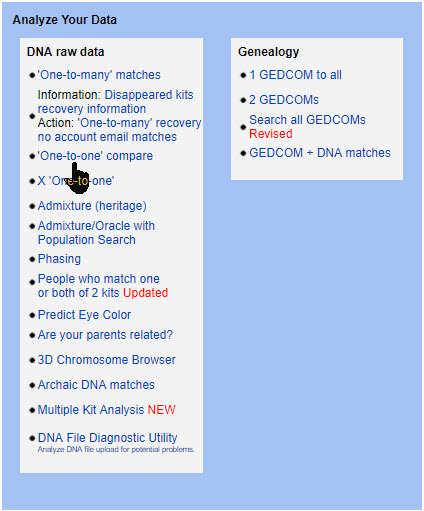

GEDmatch compare DNA


Enter your GEDmatch kit number and your match's kit number on the next page. The GEDmatch kit numbers will each start with a letter. Below, one kit begins with the letter A indicating that this person was tested at Ancestry DNA. The other kit begins with a T and was tested at Family Tree DNA.


one-to-one DNA comparison


Click Graphics and Positions, then click Submit.

Here is an example of one of the matching DNA segments.


GEDmatch chromosome browser


If you click "Position Only" instead of "Graphics and Positions" in the Comparison Entry Form, you will get a nice table that you can use when you transfer these segments to a database or to a tool like DNA Painter.


matching DNA segments


To see what you can do with these segments, please see Using DNA Painter to reconstruct ancestral DNA.


Tree symbols on your family tree


What if you see the family tree symbol in your own family tree? You can find out who created this link, and see if you have any matching DNA segments.   

I found these links on one of my family trees, but I did not create them. Click the green tree symbol.


GEDmatch linked family tree


You will be taken to the ancestor in your family tree. At the bottom of the screen you will see "Other GEDCOMs that include this individual." This section does not list all GEDCOMs that contain your ancestor; it only lists GEDCOMs that somebody has linked.


GEDmatch ancestor


Click the GEDCOM number. Now you will see your ancestor as he appears in your match's family tree. A link to your tree will appear at the bottom.


GEDmatch ancestor

 
Both people can now see that this ancestor appears in another person's tree. If more than one person linked these ancestors, the bottom of the screen would appear like this:


Linked GEDCOMs


Someone linked the ancestors, but do we share DNA?


We have found a common ancestor, and we want to see if we have any matching DNA segments. There is no link to this person's DNA kit on his family tree page; there is only a link to his GEDCOM. But we can use his GEDCOM number to find his kit number. Copy the "GEDmatch Ref" number. 


GEDCOM number


Go to your home page, and click User Lookup in the Learn More section. You can use this field to look up someone by GEDmatch kit number, GEDCOM number, or email address.


GEDmatch user lookup


You copied the GEDmatch Ref number which is actually his GEDCOM number. Enter the "GEDmatch Ref" into the "GEDCOM (genealogy) ID number" field. Then click Display Results.


GEDmatch User search


You will see this person's GEDCOM number, the name of the person who took the DNA test, email address, GEDmatch Kit number, and the name and email addresss of the person managing the kit. Copy the Kit number that appears directly above your match's name. Kit numbers are used for DNA matching.


GEDmatch user


Now you can do a One-to-one comparison to find matching DNA segments. Enter your kit number and your match's kit number.


GEDmatch one-to-one


Here are the matching DNA segments!


matching DNA segments


What is really nice about GEDmatch is that when we all work cooperatively finding and linking common ancestors, we will more easily prove the relationships with DNA.

Once you know your match's kit number and GEDCOM number you can do complete family tree and DNA comparisons to find DNA that you inherited from your common ancestors.


What's next?

.
Verify that your GEDCOM is correctly linked to your GEDmatch kit.

Practice the comparison tools.  It will be a little frustrating, because you will have to switch screens multiple times. But the results are worth it. The matching results are why you uploaded to GEDmatch in the first place!

Learn about a great tool for displaying your DNA matches. You'll love this one! See Using DNA Painter to reconstruct ancestral DNA.

How to use GEDmatch - Part 3 will be coming soon.

Monday, January 15, 2018

My Heritage now has the essential DNA tools.


I began my post Getting started with GEDmatch with the following discussion:

_________________________________________________________________
There are two very important items for using DNA testing for family history. 

  • Documented family tree. A documented family tree contains proof of family relationships including copies of birth and marriage records, census records, etc. 
  • Documented DNA. Documented DNA includes a chromosome browser to prove family DNA relationships. To learn more about the importance of chromosome browsers and how to use them, please see What is the big deal about a Chromosome Browser?

You may have heard the saying, "Genealogy without documentation is mythology."  I'd like to also say, "DNA without a chromosome browser is mythology."

It would be wonderful if the documented family tree and the chromosome browser were together in one location. 
__________________________________________________________________

A documented family tree and documented DNA has not been available at any of the major DNA testing companies. Until now.


MyHeritage tools


MyHeritage has had documented family trees for years. For the past few years, it has been offering autosomal DNA tests. But it was on January 11, 2018 that MyHeritage finally offered the essential chromosome browser. See Major Updates and Improvements to MyHeritage DNA Matching.

Let's examine the new MyHeritage system.


Your DNA matches 

 
Log into your MyHeritage account. Click the DNA tab, then select DNA matches from the menu.


MyHeritage DNA matches


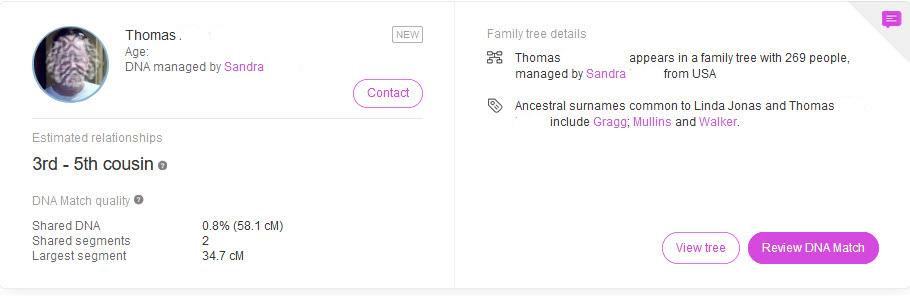
You will see a list of people who share common DNA segments with you. Here is one of my matches.


MyHeritage DNA match


Even though there is a link to "View Tree", it is best to click Review DNA Match. We want to see what information is shared between my match Thomas ("Tom") and me.

I contacted this person, and I know that both Tom's and my kit were transferred from Ancestry DNA. So we will be comparing two Ancestry DNA kits with MyHeritage tools.

Click "Review DNA match." You will see everything on one page.


Common surnames


If you and your match have any common surnames in your trees, they will be shown. My ancestors appear on the left, and my match's ancestors appear on the right. This is one of the common surnames:


MyHeritage matching surnames


Common DNA matches


In the next section you will see a list of common DNA matches.  These are some of the people who appear on Tom's match list and on my match list.


MyHeritage DNA matches


Family Trees


You can see both your own and your match's family tree so that you can easily compare the two.  Click on the "You" tab to see your tree.


This is a portion of Tom's family tree.


MyHeritage family tree


In our match's family tree, we are looking to find ancestors who are also in our family tree. The common ancestors that Tom and I share are Jonathan Gragg and Mary Mullins. 

By comparing the two family trees, we accomplish two things:
  • We can find our common ancestors, and use the chromosome browser to find DNA segments that we may have inherited from those ancestors.
  • We can enhance our family tree if we find ancestors that are missing from one of the trees. For example, in the second family tree there are no parents for Jonathan Gragg. We can click on Jonathan Gragg to begin exploring records that could verify that his parents are Henry Gragg and Elizabeth Jones.


MyHeritage family tree


Below the family trees, you will find a section for common ethnicities [not shown], then we get to the chromosome browser.


MyHeritage chromosome browser


The chromosome browser shows DNA segments that are shared between you and your match. 


MyHeritage chromosome browser


By comparing family trees, I have determined that the only common ancestors shared by Tom and me are Jonathan Gragg and Mary Mullins. So I assume that we inherited the above two segments from either Jonathan or Mary, or we inherited one segment from each of them. I cannot be sure of any of this yet.

When you click on a segment in the chromosome browser, you will see segment details including the exact position on the chromosome and the size of the shared segment stated in centiMorgans (cM).


DNA segment details


How valid are these DNA segments?


I cannot be certain that we inherited these common segments from Jonathan or Mary, or if there is another common ancestor that we have not yet found. 

I can get more evidence by comparing DNA with other descendants of this couple to see if they also share the same segments.


GEDmatch chromosome browser


MyHeritage does not yet allow us to compare more than one person in the chromosome browser. [Update: You can now compare multiple people in the MyHeritage chromosome browser.  It's fantastic!] Several descendants of Jonathan and Mary have been DNA tested. We can see their results in the GEDmatch.com chromosome browser to compare it to Tom's results in the MyHeritage chromosome browser.

First, I can compare my DNA results with Tom's DNA results and display them in the GEDmatch chromosome browser. The shared segment on Chromosome 1 is shown in the GEDmatch and MyHeritage chromosome browsers. 

However, notice that there is a small shared segment on Chromosome 4 that is not reported by MyHeritage.


GEDmatch chromosome browser


Below are chromosomes 9-22. The matching segment on Chromosome 18 is also shown at MyHeritage.


matching DNA segment


Now let's compare two other descendants of Jonathan and Mary, and put them in the chromosome browser with Tom.

All three descendants share a segment with me on Chromosome 1 and Chromosome 18. Chromosome 18 is shown here:


multiple matches on chromosome


What about Chromosome 4? Tom and one cousin share matching segments with me on chromosome 4, but they are different segments. Only Tom has the small segment on line 2 of Chromosome 4. Although this segment is slightly larger than 8cM, it is not shown by MyHeritage. 


small DNA segments


Because only Tom has this segment, it could a coincidental match [called IBS or Identical By State] instead of a segment inherited from the common ancestor [called IBD or Identical By Descent]. It may have been correctly rejected by MyHeritage.

How about this match on Chromosome 6? All three cousins share this segment with me on Chromosome 6, but this segment is too small to be considered a shared segment by MyHeritage.


small DNA segments


It appears that MyHeritage is showing only segments in its chromosome browser that seem to be high-confidence shared DNA segments. 


Add notes 


When you have found shared DNA from common ancestors, you can include this information in the notes on your DNA match list. 


MyHeritage notes


Using the chromosome browser with transferred kits


MyHeritage allows you to transfer your raw DNA data file from other DNA companies. You can do this for free. 

However, you might want to be cautious about using the chromosome browser with transferred DNA because the major DNA companies do not all test the same locations on your chromosomes. 

To make these other DNA results compatible with MyHeritage DNA results, MyHeritage uses something called "imputation." See Major Updates and Improvements to MyHeritage DNA matching.  For another opinion on imputation, see Concepts - Imputation.

When MyHeritage fills in your DNA gaps by imputing your results, it is not necessarily reflecting your DNA. It is reflecting what your DNA probably should be. 

However, by comparing DNA segments of multiple matches in the chromosome browsers where imputation is not used, MyHeritage appears to be fairly accurate.


Upcoming enhancement

MyHeritage has already announced the plan to allow us to compare two or more people in the chromosome browser. This will allow us to see the shared DNA segments inherited by multiple descendants of a common ancestor.   


What is the next step? 

If you have tested with another DNA testing company, you can download your Raw DNA Data and upload it to MyHeritage. 

This is especially important if you tested with Ancestry DNA, because Ancestry is the only major DNA testing company that does not provide a chromosome browser. There is currently no charge for uploading your DNA results to MyHeritage.

You can also download your family tree from other sites and upload it to MyHeritage. Again, this is free! 

For step-by-step instructions on downloading your DNA and your family tree, see Getting started with GEDmatch.

If you have compared your ancestry in the new MyHeritage chromosome browser, you can reconstruct your ancestor's DNA.

See Using DNA Painter to reconstruct ancestral DNA

If you tested with MyHeritage, you will also want to submit your MyHeritage results to GEDmatch, See How to use GEDmatch - Part 1 and How to use GEDmatch - Part 2.


MyHeritage now has the essential DNA tools.  


The new MyHeritage DNA system is pretty great. With a few enhancements, it will be incredible.  Here's my response to the new chromosome browser--I immediately ordered a MyHeritage DNA kit for my mother.


MyHeritage DNA kit
MyHeritage DNA kit

swabbing for DNA
Mom swabbing her cheek while reading a book


Sunday, January 7, 2018

Getting started with GEDmatch


There are two very important items for using DNA testing for family history. 

  • Documented family tree. A documented family tree contains proof of family relationships including copies of birth and marriage records, census records, etc. 
  • Documented DNA. Documented DNA includes a chromosome browser to prove family DNA relationships. To learn more about the importance of chromosome browsers and how to use them, please see What is the big deal about a Chromosome Browser?

You may have heard the saying, "Genealogy without documentation is mythology."  I'd like to also say, "DNA without a chromosome browser is mythology."

It would be wonderful if the documented family tree and the chromosome browser were together in one location.  This is not yet available at any of the major DNA testing companies.

Even better, of course, would be the ability to compare your DNA results with the results of people who tested at other DNA companies. Family Tree DNA and My Heritage DNA allow uploads of DNA raw data from other companies, but most people have not yet uploaded their results. So if you haven't done it, please do. You will also want to load your results to GEDmatch.


What is GEDmatch?


The biggest resource for DNA comparisons is a service called GEDmatch. At GEDmatch you can upload your raw DNA data from any testing company and also upload a family tree [but not the family tree documents]. 

GEDmatch offers DNA matching to people who tested at other DNA companies, the ability to see their family tree, chromosome browser, admixture reports, and much more. Large numbers of people from all DNA testing companies are using this service. 

Let's get started with GEDmatch to see how to upload the two most important files.

First, you will download your raw DNA data from your DNA testing company and upload it to GEDmatch. Next, you will download your family tree as a GEDCOM file and upload it to GEDmatch.


HOW TO DOWNLOAD YOUR RAW DNA DATA


Follow the directions below for your testing company. You must leave your file in the original zipped format. 

If you are using a Mac, your file may be automatically unzipped. In Safari, go to Preferences, then General. Uncheck the box at the bottom that says, "Open 'safe' files after downloading." The GEDmatch site shows this image:


Please note that it may take several minutes for your files to download.


Download raw DNA data from Ancestry DNA
 

Log into your Ancestry.com account. Click the DNA tab, then Your DNA Results Summary.


accessing ancestry DNA results


On the upper right of the next screen, click Settings.


Ancestry DNA settings


Find the Actions section on the right of the screen, and click Download Raw DNA Data.


download raw DNA data


Enter your Ancestry account password, click next to "I understand . . .", and click Confirm.


confirm raw data download


You will get an email when your download has finished. 


downloading ancestry DNA


Open the email:


ancestry download email


Click Confirm Raw Download.


Ancestry DNA download confirm


Your raw DNA data file will be downloaded to your computer and will look something like this:


Download raw DNA data from 23andMe


In your 23andMe account, you may have to click on several screens to complete surveys and raw data opt-ins before your can download your results. Log into your 23andMe account, and click Tools.


23andMe tools


Then click Browse Raw Data.


23andMe browse raw data


On the next screen you will see a tab for Browse and a tab for Download.  Click Download.
 

23andMe raw data download

 
Scroll down until you see Submit Request.  You will get an email when your file is ready. 


23andMe download email


Enter your  23andMe password and click Download raw data.


download 23andMe raw data

 
Your file will be downloaded to your computer and will look something like this:


Download Raw DNA data from Family Tree DNA


Log into your Family Tree DNA account, and click the myFTDNA tab at the upper left of your screen. Then click the arrow next to Family Finder.


my FTDNA Family Finder


Select Download Raw Data from the bottom of the list.


Family Finder raw data download


Click the arrow next to Build 36 Raw Data Concatenated. This file includes both autosomal DNA and X-chromosome DNA.


Your raw data will be immediately downloaded to your computer.


Family tree DNA raw data file


Download raw DNA data from MyHeritage

MyHeritage has a good tutorial on how to download your results.  It includes images, so I don't need to repeat it here. See How do I download my raw data file from MyHeritage?


Upload your raw DNA data to GEDmatch


Go to GEDmatch.com, and create an account if you don't already have one.


create GEDMatch account


After you have created and logged into your account, find the File Uploads section on the right side of the page. Notice that there are two sections: Raw DNA file uploads and Genealogy - Family Trees. You will use both sections to load your DNA and your family tree.

Click Generic Upload FAST.


GEDmatch DNA upload


Fill in the information on the next screen. If you don't want your name to be seen by your matches, you can choose an alias, but it should be similar to your real name.


enter GEDmath account information


It is very important to click Yes next to the Please acknowledge section. Otherwise, you won't be able to make matches!

Now go to the bottom of the page to upload your raw DNA data file. Click Browse to find the file you downloaded to your computer [it is usually in your Downloads folder].


find raw data for GEDmatch


Find the file you downloaded from your DNA testing company. DO NOT open the file. Here is an example of a raw data file:


Click the name of the file, then click upload.


Watch as your file is uploaded. After it is fully uploaded you will be able to use a few tools, but it will take about 24 hours before you can use the best tool which is the one-to-many matches.


Adding a Family tree to GEDmatch


Now we get to the second important part--uploading your family tree. Many people build their family trees on either Ancestry or MyHeritage, so I will show how to download from these sites. You will be using something called a GEDCOM file which stands for GEnealogial Data COMmunication. If you have a family tree at another online website, see its Help section to find out how to download your tree. If you use a genealogy software program, you can also create a GEDCOM file from your program. See your software User Guide to see how to create a GEDCOM file.


Downloading your family tree from Ancestry.com


Log into your ancestry account, and click trees.


Select the family tree you want to download. Here I have a tree named "DNA Tree." Then click Tree Settings.


On the next screen find the Manage your tree section on the right side of the page. Click Export Tree.


Your GEDCOM will begin processing.


Once your GEDCOM file is complete, click Download your GEDCOM file.


Your GEDCOM file will look like this:


Downloading your Family Tree from MyHeritage


Log into your MyHeritage account, and click Family Tree.


From the drop-down menu, select Manage Trees.


manage trees at MyHeritage


Across from the name of your tree, click on Export to GEDCOM.


export MyHeritage family tree


Click Begin the export.


Your GEDCOM file will be generated.


MyHeritage GEDCOM


You will receive an email when your file is ready. When you download the file to your computer, it will look like this:


Uploading your family tree to GEDmatch


In your GEDmatch account, go to the File Uploads section, and click GEDCOM genealogy upload.


add family tree to GEDmatch


Name your GEDCOM file, and select the GEDmatch kit where you want to attach this tree. Then go to the bottom section and click Browse. Find your GEDCOM file, and click Upload.


upload GEDCOM file to GEDmatch


Getting started with GEDmatch


Once your Raw data file has processed you will be able to see a list of matches, be able to find common ancestors by looking at their family trees, compare DNA in a chromosome browser, and more.  Your favorite tool will probably be the 'One-to-many' matches. When you click on the link, you can enter your kit number and search GEDmatch's entire database for people who share DNA with you. You can see the exact matching segments by using the chromosome browser.


GEDmatch one-to-many


In the following image you will see a match list. I have removed many of the columns including the ID number, user name, email address, etc. This image may appear daunting at first, but the important column here is the one that has the blue GED. This column indicates that the person has uploaded a GEDCOM file.  Click the blue link to see the family tree. 


GEDmatch family tree


The problem is the large number of people who do not have the blue GED link. In the image above, only two of the people have added a family tree. Without that link, the rest of the people are missing the most important part of GEDmatch--the ability to find common ancestors and to see which DNA segments were inherited from those ancestors.


Getting the most from GEDmatch


Remember that it takes BOTH family trees and DNA results to use DNA for family history. If you have not yet uploaded your raw DNA data AND your family tree, please do it now!! Then start exploring GEDmatch.  It's pretty great.

Next we will use GEDmatch with the the most amazing tool ever to reconstruct your ancestors' DNA. I'm serious!  My father and grandparents died many years ago, and I'm reconstructing their DNA. It's not difficult at all. In fact, it's downright fun. You'll love it. 


Up next: Reconstructing the DNA of our ancestors

and  How to use GEDmatch - Part 1