What is GEDmatch?
GEDmatch.com is a volunteer-run website for people who have already tested their autosomal DNA at DNA testing companies such as AncestryDNA, 23andMe, Family Tree DNA (Family Finder test only), and MyHeritage DNA.
At GEDmatch you can compare your DNA results with the results of people who tested at other DNA testing companies.
GEDmatch has wonderful tools to enable you to contact your DNA matches, compare family trees, and see matching DNA segments.
If you don't have an account, go to GEDmatch.com and create one.
To get the most from GEDmatch, you will need to load two things:
To see how to upload these two items to GEDmatch see Getting started with GEDmatch.
Now log onto your account, and let's examine how to make matches.
Click the One-to-many matches link in the Analyze Your Data section.

On the next screen, enter your kit number. If you administer several kits, you can select the kit number from the drop-down menu.

Click Display Results at the bottom of the screen.
Your list of matches will appear on the next page. It will look overwhelming at first, but don't give up! Let's look at the table headings.

Here is a partial list of matches from the One-to-many comparison. The columns for Kit number, name, and email have been removed.
GEDmatch has wonderful tools to enable you to contact your DNA matches, compare family trees, and see matching DNA segments.
Getting Started with GEDmatch
If you don't have an account, go to GEDmatch.com and create one.

To get the most from GEDmatch, you will need to load two things:
- Your raw DNA data from your DNA testing company
- Your family tree
To see how to upload these two items to GEDmatch see Getting started with GEDmatch.
Now log onto your account, and let's examine how to make matches.
One-to-Many Matches
Click the One-to-many matches link in the Analyze Your Data section.

On the next screen, enter your kit number. If you administer several kits, you can select the kit number from the drop-down menu.

Click Display Results at the bottom of the screen.
Your list of matches will appear on the next page. It will look overwhelming at first, but don't give up! Let's look at the table headings.

- Kit number is the number assigned by GEDmatch. Each kit begins with a letter that indicates the testing company. For example: A is for Ancestry DNA; H is for MyHeritage; M is for 23andMe; T is for Family Tree DNA's Family Finder.
- Type is the type of testing chip used by the DNA testing company.
- Use the List column to display a list of people who share DNA with one of your matches.
- Use the Select column to compare two or more kits.
- Sex is for the sex of the person taking the test.
- GED/WikiTree contains a link to your match's family tree. GED indicates that it was uploaded from a GEDCOM file. Wiki is a link to WikiTree.
- The haplogroup columns are not very useful since they are for Mitochondrial DNA and Y-DNA. GEDmatch only compares autosomal DNA. However, if you are searching for your direct paternal or maternal line, this column can indicate if your match is within the same ancestral haplogroup.
- The Autosomal Details column is a column you will use frequently. You will click a blue A link to see a comparison of your DNA to your match's DNA.
- The Autosomal Total cM indicates the total amount of shared DNA between you and your match. It is measured in centiMorgans. Largest cM is the amount of DNA in your largest shared DNA segment.
- Gen is the estimated number of generations to your shared ancestor. This is only an estimate and will often not be accurate.
- The X-DNA columns are similar to the autosomal DNA columns. Click the X in the Details column if you want to compare shared DNA on your X chromosome. Please note that X-DNA is not the same as mitochondrial DNA. They have very different inheritance patterns. The difference will be shown later in this article.
- The last two columns are very important. They contain the name or alias of your match and the email address. This is especially useful when your DNA company does not provide email addresses.
You can sort your matches by any of these columns. For example, if you want to sort your matches by the size of the largest X-chromosome segment, click one of the blue arrows in the X-DNA largest cM column.
If you are sending an email to someone and you want to see multiple kits managed by this person, click the blue arrow under the Email column.
Find the common ancestor
Here is a partial list of matches from the One-to-many comparison. The columns for Kit number, name, and email have been removed.
You want to see if you can find a common ancestor between you and your match. Often you will find a common ancestral couple from whom you both descend. See if your match has a family tree. Click the link in the GED/WikiTree column.


If there is no link to a family tree, you may wish to contact your match to see if he/she has an online family tree.
There will not be a GED or Wiki link next to your own kit unless you loaded a family tree. If you haven't, please fix it! See Getting started with GEDmatch.

Here is Debra's family tree.

Now we get to the best part of GEDmatch--viewing the DNA you have in common.


Mitochondrial DNA (mtDNA) and X-chromosome DNA (X-DNA)
As mentioned earlier, the inheritance patterns of mitochondrial DNA and X-DNA are different. Mitochondrial DNA is found outside the nucleus of the cell. The X-chromosome is found inside the nucleus of the cell.
Mitochondrial DNA is inherited from your strictly maternal line (your mother's mother's mother . . .). Both males and females inherit their mother's mitochondrial DNA, but only females can pass it to their children. Mitochondrial inheritance is shown below in red.
Males have one X chromosome and one Y chromosome.
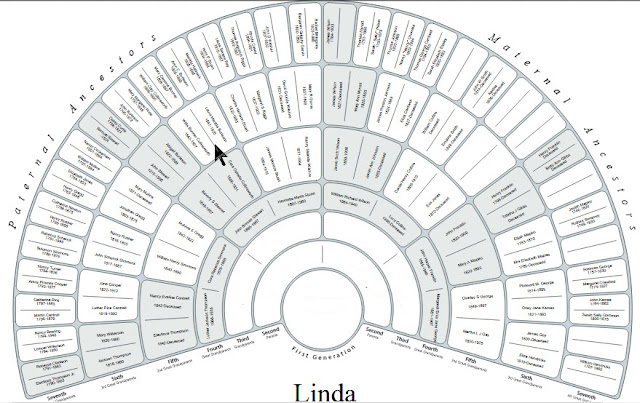
Below is a fan chart [a version of a family tree] for a male. The man's name would go in the circle at the bottom of this family tree. His father's name would go in the first space on the left directly above the circle. His mother is the first space on the right directly above the circle.
A female inherits two X chromosomes--one from the mother and one from the father. In the pedigree chart below, the female's name goes in the pink circle at the bottom. Her ancestors are displayed above.


Because I used the default settings for the one-to-one comparison, the X chromosome browser is showing the largest segment, but no other segments.
Here are the new X-DNA chromosome browser results:


If there is no link to a family tree, you may wish to contact your match to see if he/she has an online family tree.
There will not be a GED or Wiki link next to your own kit unless you loaded a family tree. If you haven't, please fix it! See Getting started with GEDmatch.
Comparing family trees
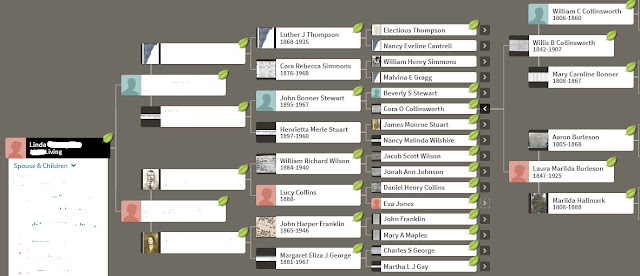
I have contacted one of my matches who did not yet load a family tree to her GEDmatch account. Her name is Debra, and we compared family trees at Ancestry.com. Below is my family tree.

Here is Debra's family tree.

Our common ancestors are Willis Collinsworth and Laura Burleson. Debra probably inherited a lot more DNA than I did from Willis and Laura because they are her great-grandparents, and they are my 3rd-great grandparents.
Comparing DNA
Now we get to the best part of GEDmatch--viewing the DNA you have in common.
Click the A in the Autosomal Details column to compare DNA.


When you click the blue A you will be doing a one-to-one comparison.
The two kit numbers (yours and your match's) will be automatically entered into the entry form. Click Graphics and Positions to view a complete match. Click Submit at the bottom of the form.
The two kit numbers (yours and your match's) will be automatically entered into the entry form. Click Graphics and Positions to view a complete match. Click Submit at the bottom of the form.

You will see the chromosome browser on the next page. When you click "Graphics and Positions" you see a graphical representation of your chromosomes.
If there are any matches they will be highlighted with the following colors. The blue Matching segment size will change based on the settings you set in the Comparison Entry Form; 7 centiMorgans is the default size.

You can change the segment sizes in the chromosome browser by entering a different value in these sections:

For example, if you change the Minimum segment cM size from 7 to 10, your key will appear as follows.

Comparing my DNA to Laura's, we see in the chromosome browser that our only common DNA was found on Chromosome 5.
The blue bar indicates that the segment size is greater than 7 centiMorgans. The yellow tells me that this is a "Half Match" meaning that it came from only one of my parents.
The Position table above Chromosome 5 tells the exact chromosome position and size of the match.

Since I know the common ancestral couple, I can begin to prove that the segment on chromosome 5 was inherited from either Willis or Laura.
A DNA match to one person is not enough to prove that this DNA segment was inherited from Willis or Laura. It could have come from another common ancestor that we have not yet identified.
I need to find other descendants of Willis and Laura who share the same DNA segment. There are many tools to do this. One great tool is DNA Painter. See the link at the bottom of this article.
We will examine some of the other tools in future articles.
Mitochondrial DNA (mtDNA) and X-chromosome DNA (X-DNA)
As mentioned earlier, the inheritance patterns of mitochondrial DNA and X-DNA are different. Mitochondrial DNA is found outside the nucleus of the cell. The X-chromosome is found inside the nucleus of the cell.
Mitochondrial DNA inheritance
Mitochondrial DNA is inherited from your strictly maternal line (your mother's mother's mother . . .). Both males and females inherit their mother's mitochondrial DNA, but only females can pass it to their children. Mitochondrial inheritance is shown below in red.
 |
| Inheritance of Y-DNA [blue] and Mitochondrial DNA [red] |
X-DNA inheritance for males
Males have one X chromosome and one Y chromosome.
Below is a fan chart [a version of a family tree] for a male. The man's name would go in the circle at the bottom of this family tree. His father's name would go in the first space on the left directly above the circle. His mother is the first space on the right directly above the circle.
A man cannot inherit X-DNA from any ancestors on his father's side of the family. The male and female ancestors from whom he could have inherited X-chromosome DNA are highlighted in blue for males and pink for females. Here is the pattern of X chromosome inheritance for a male.
 |
| X-DNA inheritance for males |
X-DNA inheritance for females
A female inherits two X chromosomes--one from the mother and one from the father. In the pedigree chart below, the female's name goes in the pink circle at the bottom. Her ancestors are displayed above.
Here are the possible ancestors from whom a female could have inherited X-chromosome DNA.
 |
| X-DNA inheritance for females |
My match and I share the common ancestors Willis Collinsworth and Laura Burleson. Here is a fan chart of my ancestors pointing the common ancestral couple. I could have inherited X-DNA from either of them.

Again, we see the same family tree shown in pedigree view.

Here is the family tree for my match, Debra. Compare these ancestors to the above fan chart for X-DNA inheritance for females. Debra also could have inherited X-chromosome DNA from either Willis or Laura.

Comparing X-DNA segments in GEDmatch
In addition to the match on chromosome 5, Debra and I have a match on the X chromosome. Debra's kit is the third kit in the image below. Click the blue X link to see the X-DNA match.

In the X-DNA Comparison Entry Form, click on Graphics and Positions, then click Submit.

Using the default settings I see the following:

In the One-to-many match results, it showed that Debra and I share a total of 72 centiMorgans on the X chromosome.

Because I used the default settings for the one-to-one comparison, the X chromosome browser is showing the largest segment, but no other segments.
Although the X-DNA Comparison Entry Form allows me to change the default values, it does not state what the default values are. However, they are the same as the defaults for the autosomal DNA comparison.
The default value for SNP count minimum threshold is 500, and the default for Minimum segment cM size is 7. I will see a difference in the results in the chromosome browser if I experiment with the settings:

The default value for SNP count minimum threshold is 500, and the default for Minimum segment cM size is 7. I will see a difference in the results in the chromosome browser if I experiment with the settings:

Here are the new X-DNA chromosome browser results:

Knowing that Debra and I share segments on the X-chromosome is more evidence that we share Willis Collinsworth and Laura Burleson as our common ancestors.
What's next?
Experiment with your GEDmatch account.
- See your list of DNA matches by clicking the One-to-many matches link.
- Use the GED/Wiki column to see family trees and find common ancestors. If you don't see a family tree link, contact your match using the email address in the Email column of your match list.
- Try the One-to-one autosomal comparison by using the blue A link.
- Try the One-to-one X-DNA comparison by clicking the blue X link.
After that, see the following:
- See how to use your GEDmatch results to create a personal DNA map. You can also create a DNA map for your ancestors. See Using DNA Painter to Reconstruct Ancestral DNA.


